
Methodology
Introduction: The HomeoWonk Synthesis Architecture
Purpose & Archival Nature: Distilled Synthesis, Not Verbatim Text
A foundational principle of HomeoWonk is that it is not a raw verbatim text reader or static eBook repository.
Classical homeopathic literature—spanning over two centuries across dozens of foundational authors—is characterized by fragmented regional editions, inconsistent anatomical taxonomies, Victorian clinical vernacular, disparate grading scales, and hundreds of thousands of isolated rubrics. Simply pasting or searching raw historical text creates noise, false positives, and clinical ambiguity.
Instead, HomeoWonk operates on a rigorously distilled, normalized, and structured clinical synthesis. Every repertory rubric, remedy monograph, relationship matrix, and differential insight within the system is the result of a multi-stage distillation pipeline designed to extract core homeopathic truth while eliminating linguistic and structural artifacts.
The Distillation & Extraction Methodology
Our distillation architecture processes the historical corpus through four systematic transformation layers:
┌────────────────────────────────────────────────────────────────────────┐
│ 1. CANONICAL INGESTION & DE-DUPLICATION                                │
│ Ingestion across 8 Master Repertories & 12 Classical Materia Medicas   │
└───────────────────────────────────┬────────────────────────────────────┘
                                    │
                                    ▼
┌────────────────────────────────────────────────────────────────────────┐
│ 2. PHENOMENOLOGICAL EXTRACTION & SYNTAX CLEANING                       │
│ Stripping typographical noise, editorial artifacts, letter buckets     │
└───────────────────────────────────┬────────────────────────────────────┘
                                    │
                                    ▼
┌────────────────────────────────────────────────────────────────────────┐
│ 3. HARMONIZATION & ONTOLOGICAL BRIDGING                                │
│ Mapping archaic synonyms to Kentian / Boenninghausen clinical concepts │
└───────────────────────────────────┬────────────────────────────────────┘
                                    │
                                    ▼
┌────────────────────────────────────────────────────────────────────────┐
│ 4. MULTI-AUTHOR CONSENSUS & GRADE CALIBRATION                          │
│ Normalizing grades (1–3), resolving contradictions, verifying provings │
└───────────────────────────────────┬────────────────────────────────────┘
                                    │
                                    ▼
┌────────────────────────────────────────────────────────────────────────┐
│ RESULT: HIGH-FIDELITY CLINICAL DECISION SUPPORT SYSTEM (CDSS)          │
└────────────────────────────────────────────────────────────────────────┘
1. Canonical Ingestion & Author Coverage
The source extraction draws comprehensively from primary homeopathic literature:
- 8 Classical Repertory Lineages: J.T. Kent (1897), C. von Boenninghausen (Therapeutic Pocket Book, 1846), C.M. Boger (Boenninghausen’s Characteristics & Repertory, 1905; Synoptic Key, 1915), C. Hering & C.B. Knerr (Guiding Symptoms, 1896), W. Boericke (1901), S. Lilienthal (1878), J.H. Clarke (1904), and W.D. Gentry (Concordance Repertory, 1890).
- 12 Materia Medica Masters: T.F. Allen, W. Boericke, C.M. Boger, C. von Boenninghausen, W.H. Burt, J.H. Clarke, E.A. Farrington, C. Hering, J.T. Kent, S.R. Phatak, F. Vermeulen, and G. Vithoulkas.
2. Phenomenological Extraction & Artifact Elimination
Historical texts contain century-old typography, OCR noise, indexing shorthand, and author-specific layout artifacts. Our extraction pipeline systematically:
- Strips Alphabetical Buckets & Structural Clutter: Removes historical typesetting tags (e.g., Boger BBCR’s
CONDITIONS (MODALITIES) - L - Lying - In bed, agg.is cleanly resolved to its atomic clinical meaning: Lying in bed aggravates). - Purges Non-Clinical Redundancy: Strips bibliographic book codes, publisher footnotes, printer misprints, and obsolete 19th-century pharmaceutical notations.
- Preserves Core Phenomenological Purity (§84 Organon): Retains exact sensations, modalities, anatomical locations, and emotional expressions without distorting them through modern psychiatric or allopathic diagnostic filters.
3. Ontological Concept Harmonization
A primary failure of searching raw repertories is synonym fragmentation. In raw texts, the identical symptom might appear under:
- “Stomach – Burning pain, cold drinks amel.” (Kent)
- “Gastric cavity – Heat, cold water relieves” (Boger)
- “Epigastrium – Pyrosis, desires ice” (Boenninghausen)
Our synthesis cross-maps these disparate entries into Unified Conceptual Clusters. When you analyze a symptom, HomeoWonk links related expressions across all 8 repertories into a single, cohesive clinical rubric without multiplying the symptom count in your totals.
4. Multi-Author Consensus & Grade Normalization
Different masters used different typography to signify clinical importance (e.g., bold type, italics, underlines, or Roman type):
- HomeoWonk calibrates and normalizes these disparate conventions into an unambiguous Three-Tier Clinical Grading Scale (Grade 1 = Plain/Confirmed in Proving; Grade 2 = Italic/Verified in Clinical Practice; Grade 3 = Bold/Prominent Characteristic Keynote).
- Where authorities disagree, HomeoWonk tracks the provenance and author count, giving higher mathematical confidence to symptoms verified across multiple independent lineages.
The Result:
Because HomeoWonk runs on an extracted synthesis rather than static text:
- Zero Text Bloat & Instant Latency: Instead of wading through hundreds of pages of unindexed monographs, clinicians interact with structured, lightning-fast data models.
- Mathematically Sound Repertorization: Multi-author harmonization ensures remedies with broad, cross-author confirmation rise to the top naturally without artificial scoring distortions.
- Transparent Provenance: While the working system is a distilled synthesis, every rubric and remedy recommendation cites its historical lineage, author origin, and edition year.
- Clean, Modern Clinical Flow: Clinicians can take cases, curate rubrics, differentiate remedies, and verify posology within a modern, focused interface designed specifically for clinical practice.
The Focus Selector (Methodology Lens)
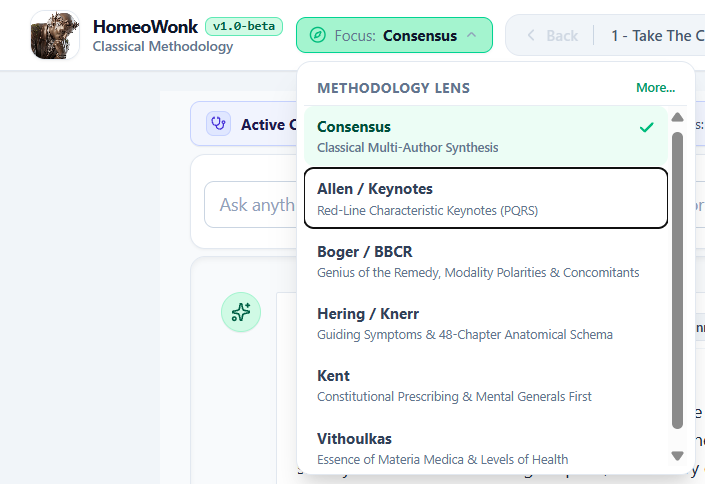
What is the Focus Selector?
Classical homeopathy is not monolithic. Over the past two centuries, master clinicians developed distinct, time-tested methodological frameworks for analyzing symptom totalities—ranging from Kent’s constitutional hierarchy to Boger’s modality polarities and Vithoulkas’s psychological essences.
The Focus Selector (located in the top navigation bar) allows the clinician to toggle the interpretive cognitive lens of HomeoWonk at any time. It instructs the clinical decision-support engine to analyze, weight, and differentiate the patient’s case through the diagnostic philosophy of a specific classical master.
What Does It Do Under the Hood?
When you switch the Focus Lens, HomeoWonk dynamically adjusts two core clinical pipelines:
- Phase 3 Bedside Differential Analysis & Posology:
- Injects specific clinical reasoning directives into the AI differential engine.
- Prioritizes the primary author’s verbatim Materia Medica monographs and confirming clinical observations over other texts.
- Structures the comparative differential rationale, red-line keynote checks, and posology guidelines according to that master’s documented clinical rules.
- Repertorial Canon Alignment:
- Re-aligns candidate scoring and cross-author authority matching with that school’s foundational repertorial canon (e.g., Boger BBCR vs. Kent vs. Knerr).
The 6 Available Methodology Lenses
1. Consensus — Classical Multi-Author Synthesis (Default)
- Philosophy: Balanced classical synthesis without single-author bias.
- Clinical Focus: Evaluates candidates across the unified canon (Kent, Hering, Allen, Boericke, Boger, and Vithoulkas simultaneously). Ideal for broad-spectrum case analysis and objective multi-author confirmation.
2. Allen / Keynotes — Red-Line Characteristic Keynotes (PQRS)
- Philosophy: Rapid bedside verification via H.C. Allen and William Boericke.
- Clinical Focus: Prioritizes sharp, unmistakable characteristic “red-line” keynotes (peculiar, queer, rare, and strange — §153). Focuses on singular clinical pointers that confirm or rule out a remedy in seconds.
3. Boger / BBCR — Genius of the Remedy, Modality Polarities & Concomitants
- Philosophy: C.M. Boger and Baron Clemens von Bönninghausen.
- Clinical Focus: Evaluates the Genius of the remedy, pathological tissue affinities, causation, modality polarities (aggravations vs. ameliorations), and distinctive concomitants. Ideal for one-sided, somatic, or highly modalized physical cases.
4. Hering / Knerr — Guiding Symptoms & 48-Chapter Anatomical Schema
- Philosophy: Constantine Hering and Calvin B. Knerr.
- Clinical Focus: Grounded in pure patho-clinical provings, physiological pathology, and Hering’s 48 anatomical rubrics. Evaluates the direction of cure according to Hering’s Law (above downward, within outward, center to periphery, reverse chronological order).
5. Kent — Constitutional Prescribing & Mental Generals First
- Philosophy: James Tyler Kent.
- Clinical Focus: Strict classical hierarchy: Mental Generals (will, affections, intellect) are prioritized highest, followed by Physical Generals (thermals, weather, cravings/aversions), with local physical complaints evaluated last. Ideal for constitutional, chronic prescribing.
6. Vithoulkas — Essence of Materia Medica & Levels of Health
- Philosophy: George Vithoulkas.
- Clinical Focus: Evaluates the patient’s deep psychological essence, core unconscious defense mechanisms, and vitality according to the Levels of Health model. Essential for complex psychological, chronic, or suppressed cases.
Tips –
- “One Case, Multiple Masters”: You can run a case under Kent, view the differential, and then switch the Focus to Boger or Vithoulkas to see how the clinical emphasis, author citations, and remedy hierarchy shift based on different classical traditions.
- Zero Token Cache: Switching focus lenses leverages HomeoWonk’s in-memory Materia Medica cache, providing rapid multi-lens perspectives.
1 – Take The Case
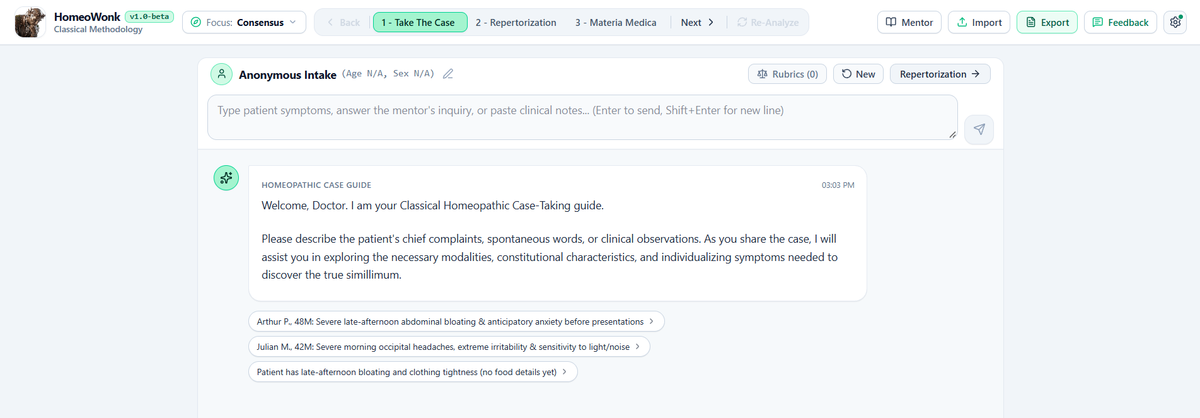
Overview
Stage 1 (“Take The Case”) is an interactive, Hahnemannian case intake workspace. It acts as an experienced homeopathic intake partner, listening to free-form case notes, conversational patient transcripts, or clinical summaries, extracting discrete homeopathic rubrics/keynotes in the background, and guiding the practitioner through a structured Socratic intake protocol (§83–§104 Organon).
Layout & Screen Elements
The Stage 1 screen is structured as a clean, single-column focused workspace:
1. Top Header Bar
Located directly above the chat stream:
- Patient Identity: Displays patient initials (restricted to max 4 uppercase letters for HIPAA compliance), age, and biological sex. Clinicians can click the Pencil icon (
Edit3) at any point to update these fields inline. CaseButton (FileTexticon): Opens the Case Summary Modal. As case intake matures, HomeoWonk maintains an organized, synthesized clinical narrative summary that can be reviewed, edited, or copied directly to the clipboard.Rubrics (N)Button (Scaleicon): A prominent badge showing the exact count of keynotes extracted so far.- Clicking this button opens the Captured Rubrics Modal.
- Inside this modal, practitioners can review the list of atomic symptoms, edit symptom text, delete inaccurate entries, or click
+ Add Rubric / Keynoteto manually enter additional rubrics with intensity ratings (1 to 4).
NewButton (RotateCcwicon): Resets the intake workspace, clearing the conversation history, compiled summary, and extracted rubrics to start a fresh patient intake.Repertorization →Button (ArrowRighticon): Advances the case to Stage 2. If rubrics have been extracted, it opens the review gate to confirm the symptom list before transitioning to the repertory engine.
2. Chat Input & Quick Starters
- Message Box: Positioned at the top of the chat area for rapid access, featuring an expandable multi-line text area and Submit button (
Ctrl+Enteror click arrow). - Starter Prompts: If starting fresh, clickable suggested prompt chips appear under the greeting (e.g., “Take case from patient narrative”, “Guide me through structured intake”, “Evaluate constitutional generals”). These update dynamically as the consultation unfolds.
3. Conversation Stream
- Reverse Chronological Flow: Newest messages and assistant replies appear at the top, allowing clinicians to review the latest guidance without constantly scrolling to the bottom.
- Organon Citations: Assistant replies link directly to Hahnemann’s Organon of Medicine aphorisms (e.g.,
§84,§153), which open interactive reference modals when clicked.
How Case Taking Operates (The Socratic Intake Engine)
HomeoWonk’s conversational backend runs on a 3-State Clinical Intake Protocol designed around classical homeopathic principles:
State A: Narrative Intake & Atomic Extraction
- What the Clinician Does: You paste or type case notes, raw patient interview text, or chief complaints.
- How HomeoWonk Responds:
- Filters Out Non-Symptoms: Strips out demographic trivia, psychiatric diagnostic labels (DSM codes), and collateral family complaints.
- Enforces Phenomenological Purity (§84): Formats symptoms strictly in plain descriptive language (e.g., Mind: Grief from loss of parent or Stomach: Burning pain, better cold water). Raw database codes and unstated psychological qualifiers are barred.
- Presents Extraction for Verification: Formats newly captured symptoms as a clean bulleted list and asks:“Is this accurate and complete so far?”
- Updates the Badge: Increments the
Rubrics (N)counter in the top bar.
State B: Compound Confirmation & Clarification
- What the Clinician Does: You affirm previous notes, provide corrections, or add further details (e.g., modalities, onset, sensations).
- How HomeoWonk Responds:
- Acknowledges previously verified findings without repeating the entire list.
- Reflects only newly added or modified keynotes.
- Probes any ambiguities (e.g., “Does the burning in the stomach improve before or after eating?”).
State C: Constitutional Completeness & Repertorization Gate (§153)
- What the Clinician Does: You indicate the core narrative is complete or ask for repertorization advice.
- How HomeoWonk Responds:
- Constitutional Audit: Checks for essential homeopathic dimensions (thermals, thirst, physical generals, sleep/dreams). If any critical domain is missing, it asks 1–2 brief, targeted questions.
- PQRS Identification: Once constitutional completeness is satisfied, it isolates 2–3 peculiar, queer, rare, and strange (§153) symptoms that will form the backbone of the repertorization.
- Synthesis: Compiles the complete narrative into the background
Casesummary and signals that the case is ready to move forward into Stage 2 (Repertorization).
2 – Repertorization
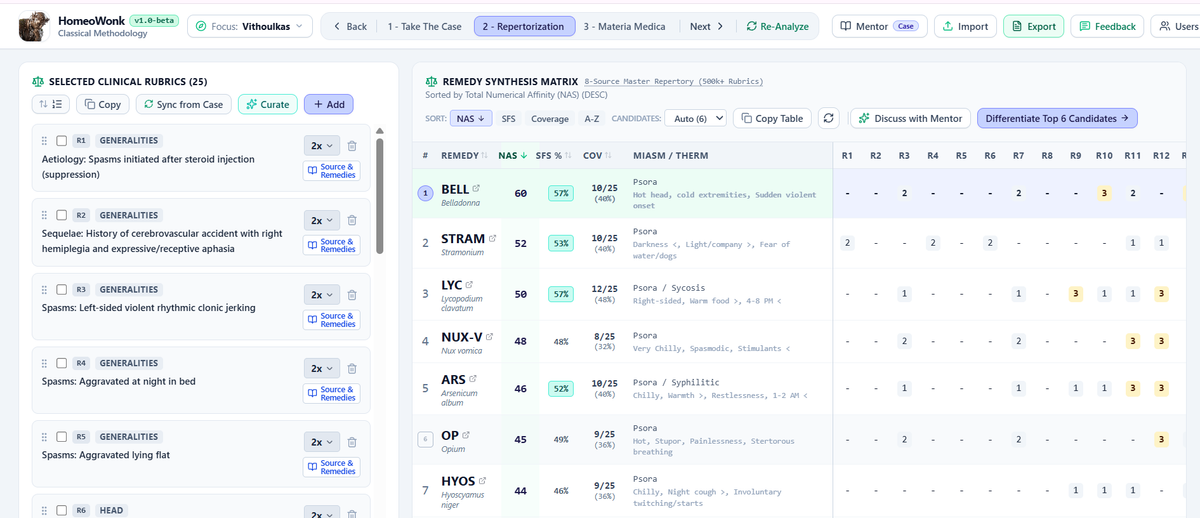
Overview
Moving from Stage 1 (“Take The Case”) to Stage 2 (“Repertorization”) is not a simple screen jump. HomeoWonk features a classical Rubric Curation & Harmonization Gate that bridges the conversational patient narrative with the classical repertory database before opening the full Repertorization Sandbox.
Step 1: Leaving Stage 1 & The Harmonization Gate
1. Initiating the Transition
When you are ready to proceed from Stage 1:
- Click the
Repertorization →button in the top right header of Stage 1 (or inside theRubrics (N)modal, clickRepertorize Cleaned List).
2. The Delta Resolution Overlay
If new symptoms were extracted during your intake that have not yet been queried against the repertory database:
- A brief background overlay appears: “Resolving narrative keynotes to classical repertory rubrics…”
- HomeoWonk queries the classical repertory databases (Kent, Boericke, Boger BBCR, Boger Synoptic Key, Hering/Knerr, Roberts Sensations As If, Gentry) in throttled batches to find historical matches.
3. The Accept Rubrics Curation Gate Modal
Once resolved, the Accept Rubrics Curation Gate opens. This ensures no modern clinical concept or narrative symptom is blindly shoved into a repertory without practitioner curation:
- One Symptom at a Time: A frozen top banner displays Symptom X of N along with the patient’s exact verbatim expression (e.g., “Burning stomach pain, better cold drinks”).
- AI & Canonical Recommendations:
- Displays matched historical rubrics from classical repertory editions with their exact chapters and authority badges (e.g.,
Kent,Boericke,Boger BBCR,Roberts). - Each suggestion includes a clinical rationale explaining why it was matched.
- Displays matched historical rubrics from classical repertory editions with their exact chapters and authority badges (e.g.,
- Harmonization & Multi-Author Consolidation:
- If multiple editions represent the same symptom, you can select more than one.
- When multiple rubrics are selected for a single symptom, HomeoWonk automatically harmonizes them into a single consolidated row in the matrix—combining remedy grades across authors without artificially inflating the number of rubrics or distorting statistical weighting.
- Manual Repertory Search & Addition:
- An embedded search bar allows you to search the canonical repertory directly by chapter or keyword to find alternative rubrics.
- Weight Assignment: Set each rubric’s clinical importance ($1\times, 2\times,$ or $3\times$ Keynote).
- Navigation & Progress:
- Click Next Symptom → (or press keyboard right arrow) to step through each symptom.
- A progress bar across the top indicates curation progress.
- Click
Repertorize Curated Liston the final step (orRepertorize All Nowto accept top recommendations immediately).
Step 2: The Stage 2 Repertorization Sandbox
Once curated, you land in the Repertorization Sandbox. The screen is divided into two primary workspaces:
┌──────────────────────────────────────┬────────────────────────────────────────────────────────┐
│ LEFT PANEL (1/3 Desktop):            │ RIGHT PANEL (2/3 Desktop):                             │
│ Selected Clinical Rubrics Basket     │ Remedy Ranking & Repertorization Matrix                │
│                                      │                                                        │
│ • R1, R2, R3... cards                │ • Frozen Columns: Rank, Remedy Name, SFS%, Coverage % │
│ • Weight toggles (3x, 2x, 1x, 0x)    │ • Scrollable Grid: Grades (1–3) under each Rubric (R1) │
│ • Drag-and-drop handles (⋮⋮)          │ • Author Provenance & Citation Drawer Links            │
│ • Macro-Rubric Grouping              │ • Sort Selectors: SFS, NAS, Coverage %, Alphabetical   │
└──────────────────────────────────────┴────────────────────────────────────────────────────────┘
Left Panel: Selected Clinical Rubrics Basket
The left column contains your active Totality Basket:
- Rubric Sorting Dimension:
- A dropdown menu sorts your rubrics on the fly:
- Order of Entry
- Weight ($3\times \rightarrow 0\times$)
- Kentian Hierarchy (Mind $\rightarrow$ Physical Generals $\rightarrow$ Particulars)
- Kentian Schema (Head-to-Toe anatomical progression)
- Chapter (A $\rightarrow$ Z)
- Rubric Name (A $\rightarrow$ Z)
- Custom (Manual Drag-and-Drop)
- A dropdown menu sorts your rubrics on the fly:
- Interactive Rubric Cards:
- Drag Handle (
⋮⋮): Reorder rubrics manually by dragging. - Weight Selector:
- $3\times$ (Keynote / PQRS §153): Highest diagnostic weight. Highlighted with an amber badge.
- $2\times$: Important characteristic symptom.
- $1\times$: General/supporting symptom.
- $0\times$ (Omitted): Temporarily excludes the rubric from calculations without deleting it (renders strikethrough).
- Harmonized Badge: Displays how many classical authors (Kent, Boger, Boericke, etc.) were consolidated into this rubric. Clicking the badge opens the Rubric Source Modal showing the exact historical text, original remedy lists, and author citations.
- Macro-Rubric Grouping (
FolderPlus): Select checkboxes next to multiple related rubrics and clickGroup as Macro-Rubricto merge them into a single clinical compound rubric.
- Drag Handle (
- Action Buttons:
+ Add Rubric: Opens the instant repertory search engine to pull in any additional canonical rubric.Sync from Case: Re-reads your intake notes if you edited the narrative in Stage 1.Curation: Re-opens the Step 1 Curation Gate if you wish to swap out any earlier recommendations.Copy: Formats and copies the complete rubric list to your clipboard (ready for Word, EHR, or clinical notes).
Right Panel: The Repertory Ranking Matrix
The right side calculates and displays mathematical remedy rankings in real time across your active rubrics:
1. Tri Scoring Engine: SFS vs. NAS vs. COV
- SFS (Similimum Fidelity Score %):
- A weighted composite score calculating Rubric Coverage Ratio $\times$ Intensity Congruence Ratio.
- It rewards remedies that cover the case deeply and match the high-intensity keynote rubrics ($3\times$), penalizing remedies that only hit low-weight generalities. Displayed as a colored percentage pill ($75%+$ is high-fidelity green).
- NAS (Numerical Affinity Score):
- The traditional cumulative grade sum: $\sum (\text{Remedy Grade} \times \text{Rubric Weight})$.
- COV (Coverage):
- A simple ratio of number of rubrics our of the whole
- Sort Controls: Click
SFS,NAS, orCoveragepill buttons to instantly reorder the remedy roster.
2. The Frozen Matrix Grid
- Sticky Identifying Columns: The Left columns (#, Remedy Name, SFS%, Coverage, Miasm/Thermals) remain frozen in place while you scroll horizontally across large rubric sets.
- Remedy Details Drawer: Clicking any remedy abbreviation (e.g., LYC, SULPH, PHOS) opens the Verbatim Materia Medica Drawer, displaying Boericke/Kent materia medica monographs, miasmatic classifications, and thermal affinity immediately.
- Column Folding: Click any column header to collapse it into a narrow strip to save screen space when analyzing dozens of rubrics.
- Clipboard Export: Click
Copy Matrixin the header to copy the full repertorization grid (as both rich HTML and clean plaintext) directly into your consultation charts.
Advancing to Stage 3: Differential Materia Medica
- The top remedies in your matrix are automatically pre-selected as candidates.
- You can
Ctrl+Clickrows in the matrix to manually select or deselect specific candidates. - Click
3 - Materia Medica →in the top pipeline stepper to advance to Stage 3 (Differential Materia Medica & Safety), where HomeoWonk performs comparative Materia Medica differential analysis, posology/potency recommendations, and safety cross-checks.
3 – Materia Medica
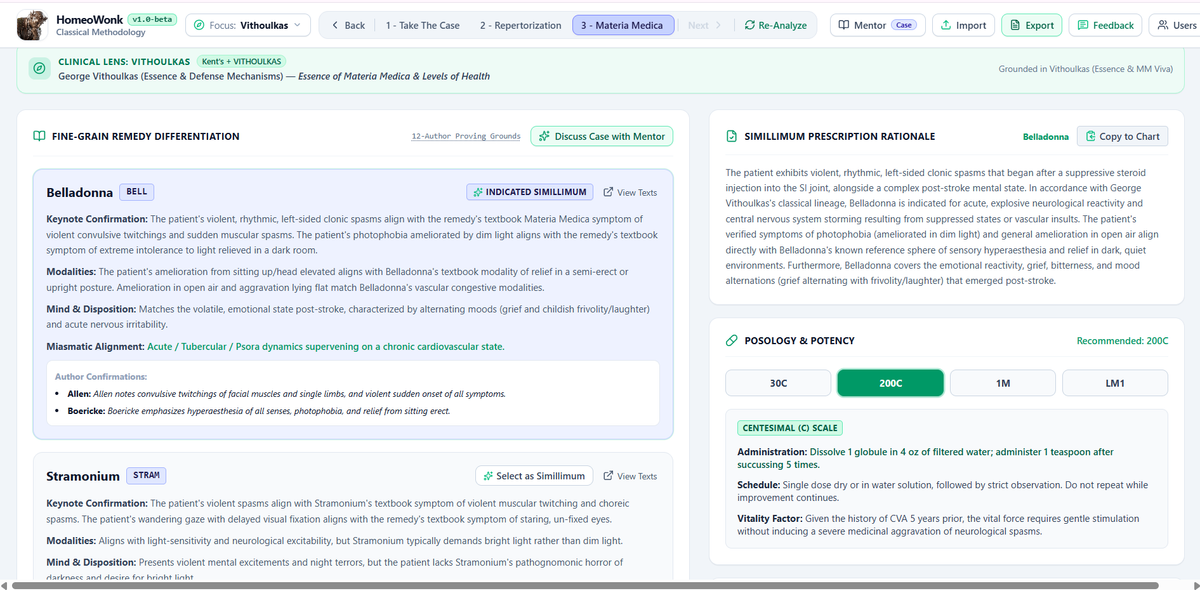
Overview
Stage 3 (“Materia Medica”) is the final clinical synthesis phase of HomeoWonk. In classical homeopathy, mathematical repertorization never prescribes—it merely narrows down a roster of candidate remedies. Stage 3 performs the fine-grain Materia Medica differentiation, cross-checks proving texts across classical authorities, formulates posology and potency strategy, and establishes bedside safety guidelines (remedy relationships, antidotes, and Hering’s Law milestones).
Layout & Screen Elements
┌────────────────────────────────────────────────────────────────────────────────────────┐
│ TOP BANNERS:                                                                           │
│ • Out-of-Sync Rubric Alert (if rubrics were edited in Stage 2 after report generation) │
│ • Active Clinical Lens (e.g. Classical Kentian, Boger General Analysis, Boericke)      │
└────────────────────────────────────────────────────────────────────────────────────────┘
┌──────────────────────────────────────────┬─────────────────────────────────────────────┐
│ LEFT COLUMN (7 Cols Desktop):            │ RIGHT COLUMN (5 Cols Desktop):              │
│ Fine-Grain Remedy Differentiation        │ Simillimum, Posology & Safety               │
│                                          │                                             │
│ • Candidate Comparison Cards             │ • Clinical Rationale & Prescribing Strategy │
│ • Keynote & Modality Verifications       │ • Potency Selector (30C, 200C, 1M, LM1)     │
│ • Mind & Disposition Alignment           │ • Repetition Schedule & Vitality Rules      │
│ • Direct Author Proving Citations        │ • Remedy Relationships Table (Inimical etc) │
│ • "View Texts" Verbatim Materia Medica   │ • Hering's Law Direction of Cure            │
│ • "Select as Simillimum" Switcher        │ • Bedside Warning Signs to Stop             │
│ • "Discuss Case with Mentor"             │ • "Confirm Prescription" Lock Button        │
│                                          │ • "Copy to Chart" (Rich EHR & Markdown)     │
└──────────────────────────────────────────┴─────────────────────────────────────────────┘
Step 1: Entering Stage 3 & Running the Differential
- Initial Arrival:
- If arriving from Stage 2 for the first time, an initiation card displays your selected candidate remedies (e.g., Nux vomica, Arsenicum album, Lycopodium).
- Click
Run Differential Analysis.
- Multi-Author Proving Cross-Reference:
- HomeoWonk conducts an exhaustive differential analysis grounding its reasoning across 12 classical masters:T.F. Allen, Boericke, Boger, Boenninghausen, Burt, Clarke, Farrington, Hering, Kent, Phatak, Vermeulen, and Vithoulkas.
- It cross-references patient PQRS keynotes against each candidate’s proving symptoms.
- Out-of-Sync Protection:
- If you step back to Stage 2, change rubric weights, or add/remove symptoms, an amber Out of Sync banner illuminates across the top of Stage 3: “Rubrics have changed — would you like to re-analyze?”
- You can click Re-analyze Materia Medica to immediately update the differential against your revised totality, or click Dismiss to retain your current notes.
Left Column: Fine-Grain Remedy Differentiation
Each candidate remedy receives an in-depth clinical evaluation card:
- Indicated Simillimum Badge: The remedy considered the closest match is highlighted with an emerald border and labeled
Indicated Simillimum. - Switching the Simillimum: If your clinical judgment favors a different candidate (e.g., Arsenicum over Nux vomica), click
Select as Simillimumon that remedy’s card.- HomeoWonk dynamically recalculates posology, repetition schedules, vitality considerations, and remedy relationships for the newly selected remedy in real time.
- Clinical Criteria Evaluated:
- Keynote Confirmation: Why this remedy matches the case’s unique PQRS symptoms.
- Modalities Match: How patient temperature, time of aggravation, and motion/rest modalities align with the proving symptoms.
- Mind & Disposition: Alignment with patient mental, emotional, and cognitive temperament.
- Miasmatic Alignment: Whether the remedy addresses the active miasm (Psora, Sycosis, Syphilis, Tubercular).
- Author Confirmations & Verbatim Quotes: Direct historical citations from proving masters confirming specific symptoms.
- Differentiating Contraindications: Specific points ruling other remedies out.
View TextsLink: Opens the Verbatim Materia Medica Modal, allowing you to read full unedited monographs from Boericke, Kent, and Clarke directly within the app.Discuss Case with MentorButton: Opens the interactive AI mentor chat to bounce thoughts, probe nuances, or test alternate prescribing hypotheses.
Right Column: Simillimum, Posology & Safety
The right column focuses on actionable prescribing decisions and clinical safety:
1. Clinical Rationale & Prescribing Strategy
- Explains why the recommended remedy is superior to the runner-up candidates and outlines the intended homeopathic strategy (e.g., acute intervention vs. constitutional foundation).
2. Posology & Potency Selection
- Recommended Potency: Suggested based on patient vitality, pathology depth, and symptom clarity.
- Interactive Potency Grid: Practitioners can toggle between
30C,200C,1M, andLM1. - Repetition Schedule: Clear administration instructions (e.g., “Single dry dose on tongue; wait and observe” or “Water split dose, succussed daily”).
- Vitality Considerations: Tailored dosing instructions based on patient constitutional strength, age, and organ clearance.
3. Remedy Relationships & Bedside Compatibility
HomeoWonk checks classical relationship charts to prevent prescribing errors:
- Complementary: Remedies that complete or reinforce the action of the chosen remedy.
- Follows Well: Optimal second-prescription candidates if symptoms shift.
- Inimical / Incompatible (Red Alert): Remedies that must never follow or precede this prescription due to risk of severe aggravation or antagonism (e.g., Apis and Rhus tox, or Causticum and Phosphorus).
- Antidotes: Neutralizing remedies if an unexpected proving or severe aggravation occurs.
4. Prognostic Direction of Cure (Hering’s Law)
- Expected Reaction: What the patient should experience within the first 24–72 hours (e.g., brief curative aggravation followed by sustained amelioration).
- Hering’s Milestones: Bulleted sequence of cure to monitor during follow-up:
- From within outward (internal organs improve before skin/extremities).
- From above downward (head/chest symptoms clear before legs/feet).
- From more vital to less vital organs (mental clarity/energy return first).
- In reverse order of symptom appearance (old suppressed symptoms briefly reappearing).
- Bedside Warning Signs: Explicit signals indicating that remedy administration must be stopped immediately.
5. Confirming & Exporting to Chart
Confirm PrescriptionButton: Toggles the case into locked status, recording the confirmed prescription and potency.Copy to ChartButton (ClipboardCopy):- Copies a comprehensive, formatted consultation record to the practitioner’s clipboard.
- Generates both Rich HTML (for pasting with colors, tables, and formatting into modern EHR systems or Word/Google Docs) and Clean Plaintext (for text-only charts or email records).
Mentor Mode
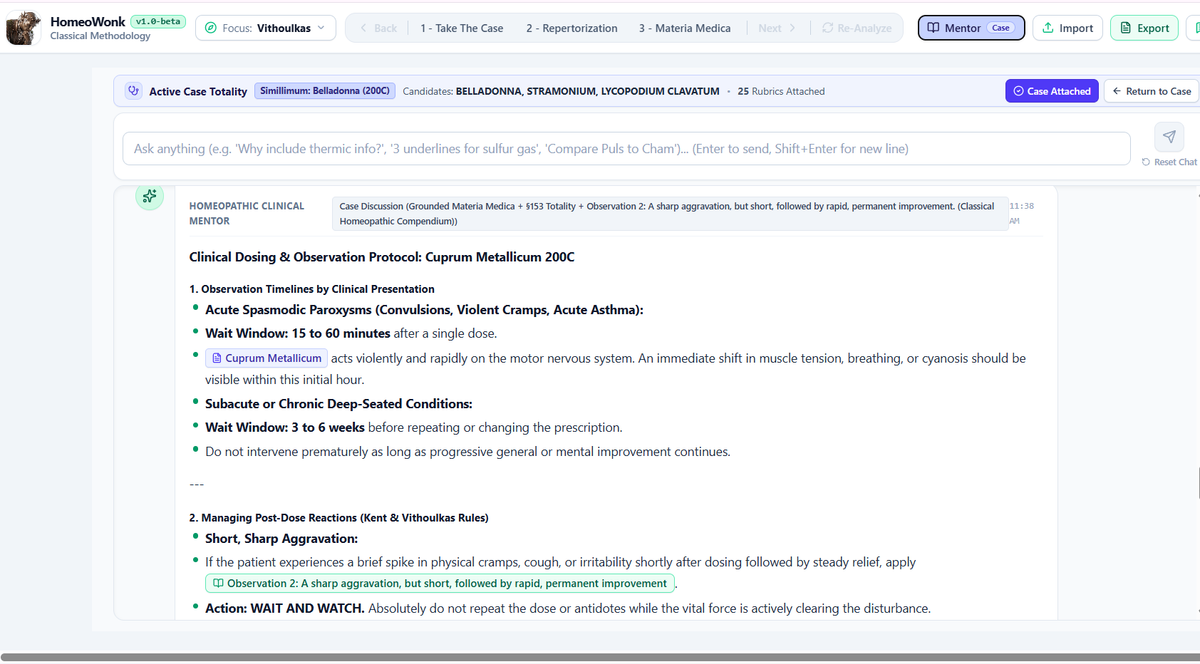
Overview
Mentor Mode is HomeoWonk’s interactive classical homeopathic knowledge engine and clinical companion. It bridges deep theoretical literature with real-time case reasoning, drawing upon:
- The Unified Master Repertory: Consensus data across 8 classical editions (Kent, Boenninghausen TPB, Boger BBCR, Hering-Knerr, Clarke, Boericke, Lilienthal, Gentry) encompassing 120,000+ harmonized concepts and 500,000+ classical rubrics.
- 1,028 Materia Medica Monographs: Grounded across 12 classical masters (Allen, Boericke, Boger, Boenninghausen, Burt, Clarke, Farrington, Hering, Kent, Phatak, Vermeulen, and Vithoulkas).
- 14 Classical Case Protocols: Evaluates totality completeness, symptom hierarchy, and Hering’s direction of cure based on Hahnemann (§83–§104, §153), Pierre Schmidt, Nash, Close, Roberts, and Vithoulkas.
Mentor Mode operates in two distinct operational environments: Case-Attached Mentoring and Standalone Exploration.
1. Case-Attached Mentoring & Dynamic Updating
When you enter Mentor Mode during an active case consultation (e.g., by clicking Discuss Case with Mentor in Stage 2 or Stage 3, or selecting Mentor Mode in the header):
A. The Active Case Totality Banner
A dedicated banner illuminates across the top of the chat:
- Current Patient & Totality: Displays patient initials, age, sex, count of attached rubrics, leading candidates, and currently indicated Simillimum/potency.
Case AttachedToggle (CheckCircle2): Clinicians can toggle this button on or off at any moment. When active, every question you ask automatically includes your patient’s symptoms, rubrics, and differential context.Return to CaseButton (ArrowLeft): Instantly returns you to your previous position in the pipeline (Stage 2 or Stage 3) without losing conversation history.
B. Dynamic Two-Way Sync (Adjusting Cases Mid-Discussion)
Clinicians are never locked into an initial assessment:
- Discuss & Uncover: You can discuss a complex case with the Mentor (e.g., “My patient has severe burning stomach pain ameliorated by warm water, but the repertorization favored Arsenicum. Could this be Nux vomica or Phosphorus?”).
- Step Back & Adjust: Based on the Mentor’s insights, click
Return to Caseto adjust your case notes in Stage 1, change rubric weights in Stage 2, or add missing modalities. - Automatic Live Update: Because the Mentor’s context is reactively wired to the active consultation, the Mentor’s clinical awareness updates automatically. As long as the case remains attached, subsequent inquiries immediately reflect the revised rubrics, newly calculated Simillimum, and updated remedy scores—no need to restart the chat or re-explain the case.
2. Standalone Mode (No Case Attached)
Mentor Mode is equally powerful as a freestanding research and learning assistant when no case is loaded, or when the Case Attached toggle is turned off:
- Open-Ended Clinical Queries: Clinicians, students, and beta testers can ask broad homeopathic questions at any time.
- Unattached Inquiry Domains:
- Classical Methodology & Philosophy:
- “Why do I need to include thermic and thirst generals in a chronic case?”
- “What did Hahnemann mean by peculiar and characteristic symptoms in §153?”
- “How many rubrics should ideally comprise a repertory totality?”
- Deterministic Repertory Lookups (Grades & Underlines):
- “What remedies are 3 underlines (Grade 3) for sulfur-smelling flatus?”
- “Show all remedies in Kent for vertigo on turning head to the left.”
- Comparative Materia Medica:
- “Compare the emotional presentations of Pulsatilla, Chamomilla, and Ignatia.”
- “What are the distinguishing modalities between Bryonia and Rhus tox in joint pain?”
- Uncommon Clinical Keynotes & Pica:
- “What remedies should I consider for a child who craves eating dirt or chalk?”
- “Which remedies have headache ameliorated by profuse urination?”
- Classical Methodology & Philosophy:
Screen Elements & Interactive Features
- Top Chat Input Area:
- Positioned cleanly at the top of the workspace. Includes an auto-expanding text box supporting multi-line queries (
Shift+Enterfor new lines,Enterto submit). Reset Chat: Clears the conversation history to start a clean slate whenever desired.
- Positioned cleanly at the top of the workspace. Includes an auto-expanding text box supporting multi-line queries (
- Reverse Chronological Stream:
- Newest responses appear directly beneath the input box for immediate visibility.
- Interactive Classical Citations & Aphorism Links:
- Organon Links: Inline aphorism references (e.g.,
§84,§153,§210) are interactive; clicking them opens full English translated text and historical commentary. - Materia Medica Links: Clicking any mentioned remedy opens the Materia Medica Drawer for instant confirmation.
- Source Citation Badges: Author citations link directly to historical provenance drawers detailing the exact edition, year, and volume.
- Organon Links: Inline aphorism references (e.g.,
- Deterministic Rubric Result Tables:
- When asking for specific repertory rubrics, results are formatted into interactive remedy tables displaying Grade 3 (3 Underlines / Bold), Grade 2 (Italics), and Grade 1 (Plain) remedies. Each listed remedy can be clicked to query its keynotes immediately.